FIxbot
A study assistant for FI MUNI courses — pick a course to open its instance.
Try FIxbot
Promotional instanceprom.fixbot.fi.muni.cz
ib111
ib111.fixbot.fi.muni.cz
pa018
pa018.fixbot.fi.muni.cz
pa192
pa192.fixbot.fi.muni.cz
pb007
pb007.fixbot.fi.muni.cz
pb173
pb173.fixbot.fi.muni.cz
How to start:
- Pick your course — or the promotional instance — from the list above.
- Log in with your university credentials by selecting "Continue with MUNI Unified Login." (the promotional instance also lets you create an account with any e-mail).
- Select the chat for the target week from the selector on the right side of the chat prompt box.
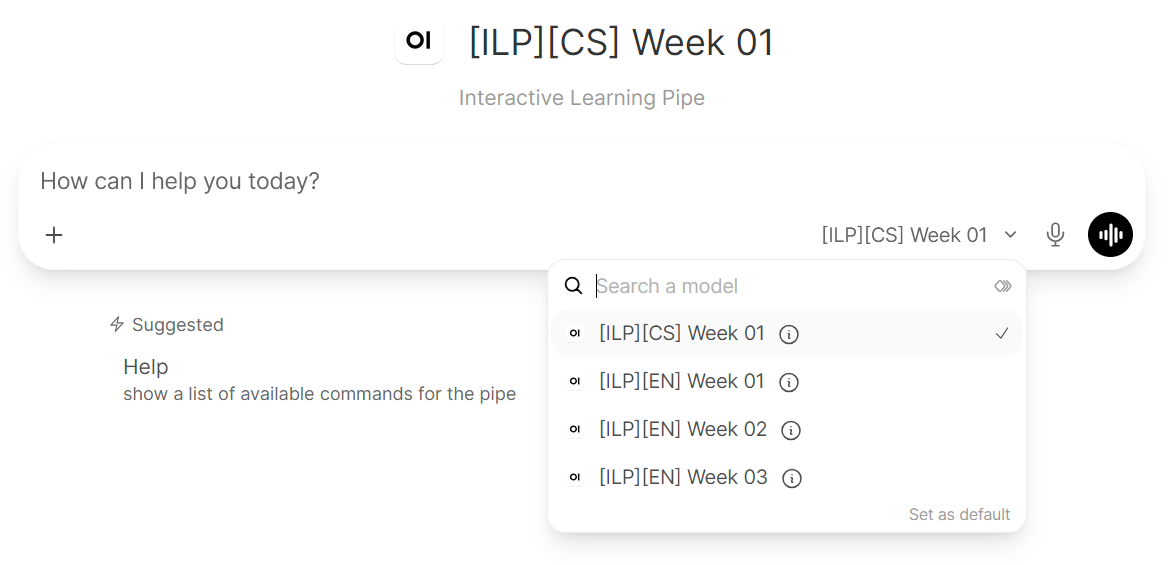
- Decide on data usage for research (displayed only once).
- Click "Help - show a list of available commands for the pipe" below the prompt box, or type
start. - Start answering the questions. Longer responses are generally preferred, as they better demonstrate your knowledge and help identify potential misunderstandings. You can also try Dictate or Voice mode (English only).
Contact us at fixbot@fi.muni.cz in case of any issues.